Showing posts with label organization. Show all posts

Wednesday, September 18, 2013

SLP 101: Learning Targets {with Freebie}

I'm back with another session in the SLP 101 series! Today's post is all about learning targets. More than likely your school building has adopted learning targets as a building so these are nothing new to you! 


Learning targets make a ton of sense. Your students should definitely know what they are working on when they come to you. If you're building is already doing 'I can' statements it's an easy carryover to the speech room. 


This year I made a simple sheet that lists an 'I can' statement for most of the areas we are working on. 


This is the bulletin board in my office. 


Then each student made their own sheet with their specific goals. 


This my board before the year started. 


This is where we posted all of our goals! 

I posted these documents as a freebie on my TeachersPayTeachers site! Just make sure you select 'follow me' while you're there! 

Do you use I can statements? How else do you have your student's know their speech and language goals?


Wednesday, September 11, 2013

SLP 101: Working Folders

During my first few segments in the 'SLP 101' series, I've mentioned 'Working Folders'. I thought I'd explain what that means to me! I actually have 3 different systems this year because I'm in 3 buildings with different needs.


I have regular student files that stayed filed in the filing cabinet. I also need another folder for my groups so that I can easily keep organized. For my elementary students I use a file folder for each group. I made up an example so I could show you! I put my attendance sheet stapled to the left hand side.  You can find my data sheet for each student included in this packet.


In the file I keep these Student Information Sheets from my friend Amy at Major Speech Minor Girl. 


I also keep the file review sheets I completed at the beginning of the year. Throughout the year as I get to know my students better, I will add packets of homework to easily pull from. 
At the middle school, I have a bit of a different system. I use binders because I travel out of my room! 


In the front I keep my daily schedule and my caseload sorted by IEP Due Date and ETR Due Date. 


That's the teacher list on the left side (still trying to learn names!) and each student has a divider with a pocket. The binders are divided by what time of day I see the students (am/pm). 

Lastly at my last school, I don't have a lot of my own 'space'. I'm using this accordion file from Target. 


Each student has a file space within it! 


PS - It happens to match my cup, which makes me happy! 

So, those are my different systems this year! It's always changing! Do you use anything similar?!


Thursday, September 5, 2013

Candy Land Storage

Some of you crafty SLPs have been sending me pictures of how you store your Candy Land adapted cards. Last week when I was in The Container Store I saw a great clear container. I loved it and new it would be perfect! 


I bought this container from the container store.

I have used these different Candy Land companion cards in SO many sessions. They are a great way to get the year started! The cards are easy to use. Just print and then replace the regular Candy Land cards. 


SLP 101: Scheduling

I'm back with another post in my SLP 101 series. This series is meant to get you started if you're new to the field or moving to the schools from another location. I'm hoping these tips and tricks for getting started are helpful. We've done SLP 101 for interviewing and salaries, getting you started, welcome letters and attendance and today we're tackling scheduling! Scheduling for speech language pathology can be a dreaded event and I haven't found the solution to make it work perfectly each year!


Before you start to schedule you'll need to gather the other schedules for your building. This includes building lunch and recess schedules. You'll need each teacher's weekly schedule. You'll also need your intervention specialists schedules. Check with OT, PT, Reading Specialists and ESL teachers for their schedules as well. Once you have everyone's schedule's you will be able to work on yours! 


I start by making a grid on a large file folder. I can adjust the times on the side of the folder as needed to meet teacher's schedules. You can see that I'm in this building for 2 and 1/2 days. I always try to schedule some 'testing time' and it helps if I go ahead and make post-it notes for those before I start. 


As you can see, I've erased some times and re-arranged because that perfect 'every half hour' schedule never seems to work out. Above is an example of what I write on my post-it. I put their grade and names. I start by making my first try for a schedule. Then I go to each teacher and let them give me feedback. 


Once I'm finished I put it into an excel sheet so that I can easily change it as the year goes. I gave you a blurry picture since I didn't want any of my kiddos' names to show! 

At the middle school, I pull each student's schedule and then start by asking the Intervention Specialists when she thinks the best time to pull the student might be. With fewer students it seems to be a bit easier to schedule.

I've heard it done many different ways, but that is what works best for me!


Danielle from Sublime Speech made this hilarious e card that about sums it up! How do you complete scheduling? Is it a hassle or do you have flexible staff?


Next  up in my SLP 101 features, I'll share my 'working folders'.

Tuesday, September 3, 2013

SLP 101: Welcome Letters,Attendance, Billing


It's Tuesday and the last of you are likely heading back to work today! Don't worry, some of us have been working for an entire month now! I'm continuing the SLP 101 series this week. We started with Interviewing and Salaries.  My last post started getting you settled in getting started in the schools. In that post I told you how I get started. 
  •   Find your caseload 
  • Gather the student files for your caseload
  • Create a caseload list: I make 3 lists: alphabetical, by IEP date, by re-evaluation date.
  • Do file reviews: see included sheet below
  • Access to IEP Files
  • Set up meetings for any immediate needs (this might include transfers into the district - they often need to be done immediately before you can begin services).
Let's keep moving on that list! Here is what we have left:
  • Create a Welcome Letter and gather any other information to send home and make folders. 
  • Develop an attendance system
  • Develop a medicaid billing system
  • Check on FM systems
  • Check on 504 students
  • Create Data Sheets
  • Create Schedule
  • Develop lesson plans for the first week. 
Folders: I use a speech folder for every student at the beginning of the year. Some students will return them weekly and some folders will never make it back into my office. I don't stress about it, but do encourage kids to bring their folders. I start the year I included two forms in that folder. 


Writing a Welcome Letter is an easy way to introduce yourself. Especially important if you're new to the district this year. 


Since I'm new I included some basic information about myself. Parents often really want to know their child's speech time, but especially when new to a district, your first pairings in groups might not work out. So I include information about gathering baseline data to determine the best fit for groups. Once I have a more finalized schedule I write their times on the folder. 

I also use a Communication Log

This is a super easy way to communicate with parents. You can download it for free in my TpT Store. 

Attendance/Billing: I keep attendance in two ways. Both quick and easy in order to facilitate billing and monitoring  serviced minutes.   In my district I am required to bill Medicaid for every service I provide. In Ohio we are not allowed to know which students receive any medicaid money, so we bill for every student. To keep attendance for billing, I print my weekly schedule and highlight names to indicate a student attended that session. I make notes if they miss or I miss. Once I enter the billing information into the computer, I slash through that group with pen. You can see I billed some of last weeks groups already. Check with your district for their billing requirements. It's easier to bill as you go, and not get way behind! 


I also monitor attendance with this quick yearly calendar. This helps me monitor IEP minutes. I have the student's name at the top. I circle the date to indicate attendance for the full time. I write other notes to indicate absences. So in this example the student 'Jenna' attended 3 session and was absent once. At a glance when I open the student's working file I can check the minutes of service for that month. 


You can grab the Speech and Language Attendance Calendar for free on my TpT Store. It includes the template name at the bottom if you want to customize it different that I did. 

504 students/FM systems: Every district is different, so check with the other SLPs to see if you are responsible for any 504 students or students with FM systems. Sometimes the SLP is the person to get the FM system set up, a critical things to take care of before the first day of school for students! 

Data Sheets: A while back I shared my data sheets with you! 


Ok! That was another jam packed post! We're almost through the 'to-do' list! Next up, I'll share my scheduling system. 

Monday, September 2, 2013

Speech Room Decorating!

When I chatted with SLP friends over the summer, many of them asked: "Have you seen your new office yet?" I know why it's so important! That office is where we spend a ton of our time! While I technically have 3 offices in my 3 buildings, my elementary building is 'home base'. I thought I'd share it with you today.


Ta-da! The room is smaller than my last office so getting all my 'stuff'' in there has been a challenge.


Of course if you follow me on Instagram, you know that the first time I saw the office the piano was in here! Luckily that was moved after the last floors were waxed! 


It was a slow process. Here's the first half of stuff moved in! 


Getting a little better! 


Once I saw my caseload and office I knew I would have many friends distracted by the things in my office. I have a large number of children with Autism or ADHD. So off to Hobby Lobby I went! I grabbed yellow and grey (I am just missing the chevron in this picture!) I don't have room to put up a cute bulletin board display like I did last year so I just picked colors I liked. 


I don't sew and I was too lazy to buy the iron-on instant hemming materials. So I just used double sided tape to hem my fabric. I added velcro to make them easy to access. 


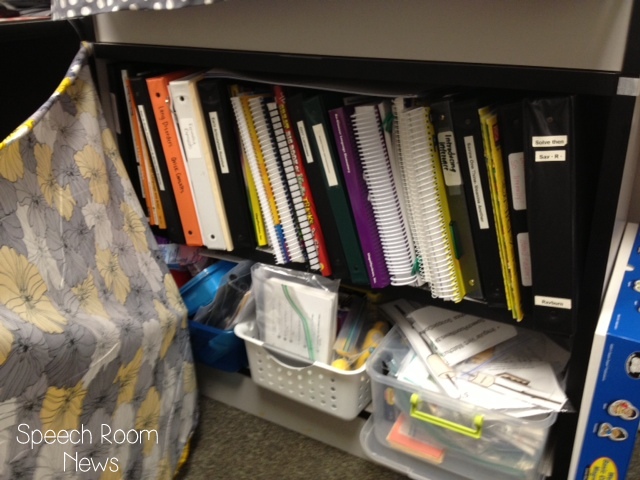
You can see my desk in this corner. A filing cabinet that needs a makeover from it's ugly green color. I will tackle that later! The stacked shelves have all my books and some materials. I grabbed that yellow pillow off my couch at home to make my chair more comfortable! The yellow and grey chevron frame above my desk is from HobbyLobby and it's magnetic. That pig is a hilarious hat I got from Goodwill. 


Here is a peek behind the curtain. The 3 bins at the bottom contain materials (artic, language and grammar.) I put a lot of my more miscellaneous TPT items here. 


No room for a coat in here! Full of games and materials on the right side. Assessment materials are located on the left side. 


This door goes into the psychologist's office. 


In the corner you can see my stack of crates that include my themed materials found on Teachers Pay Teachers. I have them in seasonal order in gallon ziplock bags in hanging file folders. The bulletin board has our Speech and Language Learning Targets! (To be shared in a post soon.)


After I snapped these pictures I needed to add fluency posters for a few kiddos. I added these from the Focus on Fluency Kit. 


This wall has my WH question visuals. I got them on BoardmakerShare.com a while ago. It also has library pockets with each student's name on it. More about what we are doing with those in the future! They are behind the door when it's propped open on purpose :) Keeping those distracted friends from seeing them everyday. And a hook behind the door for my purse and lunch box! 


I'm using a cloth bin on the floor to store my daily materials. It has my clipboard with schedule, materials for the daily groups, and working files for my groups. 


That's the grand tour! Hope you enjoyed the peek inside! If you're decorating you room make sure you post it on instagram and use #speechroomnews so I can look at it! 


Saturday, August 31, 2013

SLP 101: Getting Started in the Schools

I'm back with the third installment of SLP 101. We've already discussed Interviews and Salaries. If you're in a school based position it can sometimes be overwhelming once you get back into your office after those first professional development days.

Where do I start? What should I do first? What should I be doing that I'm not!

Since I'm in a new district this year some of those things that are usually automatic have taken a lot longer than usual! This is my personal to-do list. I put them in order for how I tackled them!
  • Inventory your materials
  • Find your caseload
  • Gather the student files for your caseload
  • Create a caseload list: I make 3 lists: alphabetical, by IEP date, by re-evaluation date.
  • Do file reviews: see included sheet below
  • Access to IEP Files
  • Set up meetings for any immediate needs (this might include transfers into the district - they often need to be done immediately before you can begin services).
  • Create a Welcome Letter and gather any other information to send home and make folders. 
  • Develop an attendance system
  • Develop a medicaid billing system
  • Check on FM systems
  • Check on 504 students
  • Create Data Sheets
  • Create Schedule
  • Develop lesson plans for the first week. 
Let's dig into a few of these to get started!

Inventory your materials: This is one thing you should really do when you move into a new space. You likely won't think about it until the end of the school year. At that time the administrator will probably ask you to turn in your inventory. If there is every a busted pipe or fire, the school needs to know what was in your office. I make an inventory in an excel sheet. That lets me email it to myself for safe keeping (an inventory stored in your room isn't much help in case of emergency!)This is also a great way to sit and take the time to really see what your building already has!

Caseload: Every school has a different system for keeping the caseloads listed. Generally speaking the special education clerks are the go-to people for this! I gather a caseload list and compare that to the actual files I have in my cabinet. Then take that list down the intervention specialists and have them identify which students they are the caseload manager for. I always ask them if they know of any move-in students that get special education services (sometimes those get left off the lists.)

Gather Files: Check for files for each student. Do you have to email other district SLPs to find current IEPs? Make sure you have a file for each student.

Create Caseload Lists: I use excel to create caseload lists. I use a different excel document for each of my buildings.  I enter my students' name, DOB, eligibility category, case manager, IEP due date, re-eval due date, grade, teacher, minutes per week and location of service. Once these are entered I copy/paste them into 3 different sheets. I sort them alphabetically, by IEP date and by re-evaluation due date.


Here is an example. I had to use myself as an example student but you can see the different sheets labeled at the bottom. Using excel makes it really easy to sort the sheets when we add kids to the caseload. If you don't know how to sort quickly in Excel, here is a quick explanation.

Next I sit and complete a File Review.

I use this sheet (available for free in my TpT store) to complete a file review. It helps me start to get to know the students. I find if I make myself write things out I remember them better. This becomes the first sheet that goes into my 'working folders' for each student. Grab the worksheet for free using this link. 

Access to IEP Forms: My district requires SLPs to have student sign off on Access to IEP forms. This sheet has teachers verify that teachers are aware that the specific student is on an IEP. I suggest you develop some type of system that has teachers verify that you have given them a copy of each student's IEP.

Transfer Meetings: In most districts transfer students need to have a meeting right away to begin receiving services for special education. Check to see if you have any students who moved-in over the summer and get those meetings schedule ASAP.


Are you hanging in? We made it through the first 7 bullets on my 'back to school' to-do list! My next post will delve into more of that list! Check back for the rest of the SLP 101 series! 

Friday, August 23, 2013

Love It and List It Linky {two}

It's time! The Love It and List It Linky Party is back! This month we're linking up to list our favorite ways to organize. No limits on this one! Organizing materials, files, schedules or whatever!


The Love It & List It Linky will happen on the 3rd Friday each month. Each month I'll throw out a topic. Any and all SLP bloggers are invited. If you want to get involved just share a short list (3-5 items) on the topic! The only requirements are that you write a NEW post and use the Linky Picture above! Then link your post at the bottom of this page (remember that if you link, don't use your general URL, use the specific POST URL)! Easy Peasy! If you don't have your own blog (uh, hello, I know most of you don't :)) just comment to share your OWN list!


The theme for this month is Love It & List It:: Organization. 

ONE::

I have packets of homework created for common goals. Here's a photo of part of the articulation packets. Here you can see files labeled 'th' packet and vocalic r packet. In these files I have about 30 pages of homework copies. I can put a copy of the packet in their working folder and just pull off a sheet each week. 

TWO::

You always ask how I organize my TpT files! Here ya go! First I have season activities in these crates. I keep packets in ziplock bags and store them in hanging files in crates. When I'm using them I pull them out and keep them by my desk. The set you're looking at is the Thanksgiving Bundle!


Here are the crates! 

THREE::

I keep some items stored in tubs. This tub is full of adapted books. Ready for grab and go! 

FOUR::

I use a shoe rack for a fun decks and cards. 

 FIVE::

I use a hanging file holder to store these sound packets (amazon affiliate link below.) These are copies from Mommy Speech Therapy. I have sound packets made up for each sound. The kids can grab the packet before they sit down. This is how we do 'drill days'. 


I have the pockets hanging over a door with these extenders. 


So that's it! Five quick ways I LOVE to organize! Now you go - and LIST it! Link up below! 

And here is a sneak peek for next month! Plan ahead! 


**I had some trouble with my linky today! Please re-link yourself if you were already linked once! Thanks!