Monday, May 14, 2012

More Apps from Super Duper Inc

It was a manic Monday! The weeks are busy, but flying by! I just wanted to swing by and share another round of reviews for the Super Duper Inc apps. Super Duper gave me codes in order to complete the reviews! The opinions on these are all mine. 


What Doesn’t Belong? This is a new one from Super Duper. Like all of their apps to date, it contains the images in the fun deck with the option of data collection. Of the apps I'm reviewing today, this is the one I've used the most! The app has cards with sets of either 3 or 4 items. The clinician can choose which cards will be targeted. I used the app the way it was intended for several students, letting them identify which card did not belong in the set. I love this one because I used it a lot of other ways too! Start by turning off the volume so that no question probes will be said. I used the same app to work on receptively identifying objects from a field of 3 and 4. I worked on expressively naming vocabulary on each card. I worked on identifying objects by function (ie: what do you use to protect your feet.) As you can see this is a flexible app! 


Homophones    Here's an app for your readers. Select the cards you want students to see, and have your students fill in the blank to practice word pairs that sound the same but have different spellings and different meanings. The prompts include statements like, “___ is my favorite color” and “Yesterday, Karla ___ Ben a story.” The best part of this app, is that you can set up automatic scoring, unlike many of the Super Duper Apps! It makes it much easier to get accurate data in case you forget to mark each response! 


Compare and Contrast   the student looks at two items on the screen and touches the screen to listen to the prompts. Ask the student to compare or contrast the items. The student then gives a verbal response. After each answer, tap the green (correct) or red (incorrect) button to score the student’s verbal response. Move to the next card by swiping the card currently on the display screen to the side, and the next image appears. Most of my kids needed help to express this relationship. I used a little white board with the carrier phrases, "___ & ___ are both ___." and "__ is __, but ___ is ___." 


Name That Category  The Name That Category App is a perfect way to check understanding of the semantic relationships between vocabulary. Have your students fill in the blank to practice describing, categorizing, and organizational skills. The prompts include fill-in-the-blank statements like, “A car, bike, and train are ___.” and “A sandwich, pizza, and French fries are ___.” 


Practicing Pragmatics  The practicing pragmatics apps is appropriate for younger students on your caseload. Slide the questions and have the students answer social skills questions about Politeness, Solving Problems, Feelings, Giving Information, Requesting, Telephone Skills, and Staying on Topic. The 52 color cards can be answered immediately or  used to set up possible topics for modeling social situations. 


What Are They Thinking   This app was developed  to improve your students' inferencing, reasoning, and conversational skills. All the people and animals in these fun cards have thought bubbles above their heads. Touch the screen to hear all of the thoughts or touch one thought bubble to hear just that character's thought. Hit the refresh button to hear a new thought for each bubble. Slide your finger to move to the next page when you're done answering this prompt! As I have noted in the past. This is one of the most open ended apps from SD! I used this one for a re-eval with a student this week! It was great for eliciting sentence samples! 


Listening for Absurdities This one is sure to elicit the giggles! Select the cards you want students to see, and have them practice their listening, reasoning, and problem solving skills as they tell you what makes each card absurd. Prompts include statements such as “The mother hen took good care of her baby octopus” and “Becky cut the paper with a fork.” I'm always surprised that my students can identify that something isn't quite right, but sometimes they have a lot of difficulty verbalizing the reason it doesn't make sense. This is a good language app to have in your tool box!


If you've read my other Super Duper app reviews you might remember that I consider them the type of apps that lighten the load you carry from building to building or room to room. The apps are limited with their interactivity, but certainly provide the opportunity for SLP's to reduce the amount of materials they need to carry to and from! 


Friday, May 11, 2012

Articulation Toss Across

I love a game of tic-tac-toe! We make a paper articulation version some days in my speech room. Today I wanted to share my great thrift store find of the month!


I found this Toss Across Game for two bucks. You can buy new by following the link or just keep your eye out for it in a thrift store near you!  The game uses spinning blocks that have X's and O's. You toss the bean bags in order to spin the blocks! Tape articulation or language cards to the top and viola! A fun day in speech!


 Of course you have to be careful to get many trials out of one turn in this game! I had my students say a target word 10 times before their turn. Next they had to make up a sentence based on the card their bean bag landed on! Here's my little friends' feet waiting for their next question! We had fun! 

Wednesday, May 9, 2012

Fluency Tracks


Okay! Have you been waiting for a post on fluency? Think I've been neglecting it? Well I just don't have too many fluency clients! Luckily a SRN follower sent me a super cute idea that I had to share with you! Take it away Connie!

To work on fluency I use Smooth and Bumpy roads . I attended a local State Speech mini session by Susan Felsenfeld PHD. CCC-SLP from Southern Connecticut State University  Her presentation was talking about stuttering and using the Lidcombe program with younger students. She had a set of straight roads to explain smooth and bumpy speech .


My intern and I changed the roads to tracks so we could use the oval to go around and around. We used differnet kinds of pasta and glued them to the road (one child figured out how to drive around the pasta so make sure that the pasta is close together so a toy car can not drive through it .)

 Connie Ziko works in an Elementary School in Connecticut. Her school houses PreK through Grade 4 with students  ages 3 to 10 years old with various communciation needs.

Monday, May 7, 2012

Snack Tray Therapy

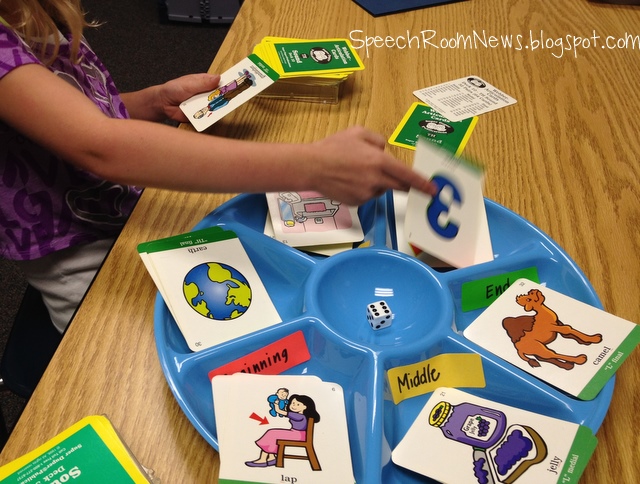
Next time you're in the dollar store, grab one of these snack platter trays. You will need post it's or labels to jazz it up therapy style. 


First step- - label the trays with numbers 1-6 on the outside and beginning, middle, end on the inside. Then grab articulation or language card decks depending on your group!


This first articulation activity focuses on using my Super Duper articulation cards. This will work perfectly with one or two students. If you have more you can put them on teams.


Each child or team should have the beginning/middle/end words facing them. They place their full deck beside the tray and a die in the middle of the tray. At their turn they roll the die. They then remove that number of cards from their deck. Next they sort the cards according to the position of their target sound in the word (B/M/E).


Play continues with each student/team rolling the die to see how many cards to sort, the students saying their words and sorting them. The winner of the game is the team with all their cards gone first! If you want to play collaboratively you wouldn't need a winner.


I also played a similar version with some of my /r/ groups. I gave them the cards and then they made up a silly sentence in the order that their cards were shuffled into the B/M/E slots. IE: The thief stole a spider covered in purple paint! Great for sentence and carryover level of instruction!


For my language focused groups, we used the numbers on the outside of the of the tray. I assigned each student in the group a number 1-4 and 5/6 were throw aways. I placed a language fun deck - Classification in this example - in the center of the table.


On their turn the students picked a card, answered their learning target and then rolled the die. They gave the card (put it into the tray) to whichever number they rolled. In the end the student with the most cards in their designated number was the winner. It's an easy way to spice up work with the fun decks of cards!


I also used the tray with the Rory's Story Cubes (which are a great activity if you don't have them you should check them out!) I had a group of 4 during this group. We each selected a story cube and rolled it in the tray. This certainly helped keep them from rolling off the table. Then we told the story as a group, each student was responsible for their part of the story based on their cube and their positions in the tray (1-6)! It was a fun way to spice up the way we usually use the cubes! After we told the story we reviewed the elements of stories (character, actions, setting, resolution, etc.) If we needed to revise we could easily do that.


We also used these in a group of two students, with the B/M/E stickers! Each kiddo used 3 of the cubes and told mini stories. Apparently I didn't grab a picture of that one!


Well that was it for my first day of winging it with the party tray! I have a feeling the ideas will be spilling out of my brain for it! I will keep updating you as I use it in new ways! Got any ideas right off the bat? I'm thinking it might lend nicely to category sorting for preschool tomorrow!

Sunday, May 6, 2012

iLuv Drawing App Giveaway


It has been the week of Following Directions apps! Today's app is a little more light hearted and a fun way to target following directions while tapping into your student's inner artist! It's friendly on the wallet at $1.99, just in case you don't win one of the 10 copies I have to give away! 


This is my self portrait via iLuv Drawing! iLuv Drawing People is a step- by-step guide for creating simple and adorable drawings of babies, moms, dads, families, girls, and boys. The app features twenty-two drawings of people, sixteen of which depict girls and boys in various action poses, such as swinging, dancing, skating, and eating fruit.


First off, your OT will love you for working on those fine motor skills. Look at all those cute people you can draw! The app gives you shadow lines to trace in small portions. To target following directions, I turn the ipad on mute. Then as the shadow lines appear I give a one, two or three step direction. I can add temporal or spatial concepts as they are appropriate for each student's abilities. So for an example I might say, " Before you draw two hands, draw the hair."


Now - of course I never use an app just for one goal or objective. You can work on expressive language too! Let one student give another student directions for how to draw the picture! This is hard and would require your student to give good details about location and ordering!  You can also have the students retell the steps to create the person! You can target pronouns by describing what your person looks like, is wearing or the activity you are doing! 


How else would you use this app?!


Check it out here in the itunes store. Thanks to Technology in Special Education I have 10 copies of this app to give away! Follow the directions to visit their page as part of your entry! Goodluck! I'll pick a winner at the end of the week!


a Rafflecopter giveaway

Friday, May 4, 2012

Princess Day!

Every once in a while, a girl just needs a princess day! My preschool kids are VERY into princesses.


This a a quick reinforcer that I made to use with them! I used it with articulation cards and several language goals as well!


The front of the cards have Cinderella on them! On the front side I attached a small piece of velcro.


The back of the cards has a magnet so they will stick to the cabinet. On about 3 of the 12 cards I placed a  glass slipper picture. The student who finds the most glass slippers, is the winner of the game. The best part of this game is the princess wand! These came from the Wal-Mart birthday party aisle. They light up which is even better! I put velcro on the back of them, so that when the child touches the wand to the card, they can pull it off!  If your kids can muster it - have them say 'Bippity Boppity Boo!" when they tap cinderella!

Grab your download HERE.

Have fun!

Thursday, May 3, 2012

Auditory Workout App Review

Auditory Workout is a new app from Virtual Speech Center, released April 2012. The app is developed for students with receptive language impairments and auditory processing disorders. While the basis for each of these disorders is different - the symptoms are very similar.  Understanding and completing multi-step directions is a key skill often targeting in therapy. The app is intended for children age 4-10, but depending on your student's cognitive abilities, could also be used for children in older grades.


The app includes hundreds of audio instructions and a feature that allows users to set background noise (classroom noise). Yes, I said background noise! This feature is so important for children with APD.  Children are welcomed by the basketball coach, who encourages them to work hard. Children earn a basketball for each correct response, and when they accumulate enough balls, they are rewarded with a game (a game of catch for younger children or/and basketball for older children).


Auditory Workout allows children to follow increasingly longer and more complex directions and includes more than 13 levels of difficulty. The directions are divided into four categories:
- Basic Directions- Quantitative and Spatial directions- Temporal directions - Conditional Directions


This is an app I have been needing for many of my students. Following directions is a tedious goal to work on session after session, but my students have been loving this app!  It allows you to select various levels of difficulty that are appropriate for your clients. The game lets you select multiple clients at one time that cycle through with the name of the child on the top of the screen. Each child can work on different goals throughout the game and you can select multiple learning targets  for each child. Data reports are available at the end of sessions.


The app allows the user to repeat the directions as many times as necessary before making a selection. The biggest change I would love to see with this app is to give the therapist the opportunity to repeat questions that students answer wrong. For 2 step directions the student selects their answers before entering 'go.' I found that I could stop them before they selected 'go' but that eliminates the data keeping from the app. I'd love if when they got the answer wrong, the screen allowed for a teaching moment. 

Overall I think therapists are going to find the app incredibly useful in therapy rooms across the country! Check it out in the itunes store today!